Difference between revisions of "Rock3/dev/qt"
| (5 intermediate revisions by 2 users not shown) | |||
| Line 6: | Line 6: | ||
=== porting qt to rockchip platforms === | === porting qt to rockchip platforms === | ||
| − | ==== | + | ==== On ubuntu of x86 platform ==== |
| + | The following operations are performed on ubuntu on the x86 platform | ||
| + | |||
| + | |||
| + | =====Cross-compilation tools ===== | ||
sudo apt-get install build-essential cmake | sudo apt-get install build-essential cmake | ||
wget https://releases.linaro.org/components/toolchain/binaries/7.3-2018.05/aarch64-linux-gnu/gcc-linaro-7.3.1-2018.05-x86_64_aarch64-linux-gnu.tar.xz | wget https://releases.linaro.org/components/toolchain/binaries/7.3-2018.05/aarch64-linux-gnu/gcc-linaro-7.3.1-2018.05-x86_64_aarch64-linux-gnu.tar.xz | ||
| Line 12: | Line 16: | ||
| − | ==== download qt source code ==== | + | ===== download qt source code ===== |
mkdir -p pro/qtSourceDir && cd pro/qtSourceDir | mkdir -p pro/qtSourceDir && cd pro/qtSourceDir | ||
wget https://download.qt.io/archive/qt/5.12/5.12.2/single/qt-everywhere-src-5.12.2.tar.xz | wget https://download.qt.io/archive/qt/5.12/5.12.2/single/qt-everywhere-src-5.12.2.tar.xz | ||
tar -xvf qt-everywhere-src-5.12.2.tar.xz | tar -xvf qt-everywhere-src-5.12.2.tar.xz | ||
| − | + | ||
| − | + | ||
or you can download them from [[https://download.qt.io/archive/qt/ here]] | or you can download them from [[https://download.qt.io/archive/qt/ here]] | ||
| − | ==== | + | ===== installation ===== |
| + | |||
vi qtbase/mkspecs/linux-aarch64-gnu-g++/qmake.conf | vi qtbase/mkspecs/linux-aarch64-gnu-g++/qmake.conf | ||
| Line 88: | Line 92: | ||
vi auto.sh | vi auto.sh | ||
<pre> | <pre> | ||
| − | |||
#!/bin/sh | #!/bin/sh | ||
| − | + | export CROSS_COMPILE=/usr/local/gcc-linaro-7.3.1-2018.05-x86_64_aarch64-linux-gnu/bin/aarch64-linux-gnu- | |
| + | export PATH=/usr/local/gcc-linaro-7.3.1-2018.05-x86_64_aarch64-linux-gnu/bin:$PATH | ||
| + | export ARCH=arm64 | ||
./configure \ | ./configure \ | ||
| − | -prefix /opt/ | + | -prefix /opt/qtdir \ |
-confirm-license \ | -confirm-license \ | ||
-opensource \ | -opensource \ | ||
| Line 135: | Line 140: | ||
-recheck | -recheck | ||
| − | + | make -j4 | |
| − | make | + | sudo make install |
| − | make install | + | |
</pre> | </pre> | ||
| + | * If you encounter an error similar to the following, | ||
| + | /dir/to/source/sol.hpp:7194:59: | ||
| + | error: ‘numeric_limits’ is not a member of ‘std’ | ||
| + | add the following line to the file | ||
| + | #include <limits> | ||
| + | |||
| + | |||
| + | |||
| + | |||
sudo chmod +x auto.sh | sudo chmod +x auto.sh | ||
sudo ./auto.sh | sudo ./auto.sh | ||
| Line 146: | Line 159: | ||
<pre> | <pre> | ||
| − | test@test-desktop:/opt$ ls qtInstallDir/ | + | test@test-desktop:/opt$ ls /opt/qtInstallDir/ |
bin doc include lib mkspecs plugins translations | bin doc include lib mkspecs plugins translations | ||
| + | |||
| + | test@test-desktop:/opt$ ls /opt/qt5.9.4-arm/ | ||
| + | bin lib mkspecs | ||
| + | |||
</pre> | </pre> | ||
| + | |||
| + | |||
| + | ==== qt creator installation ==== | ||
| + | |||
| + | ===== download installation tools ===== | ||
| + | |||
| + | wget https://download.qt.io/archive/qt/5.12/5.12.2/qt-opensource-linux-x64-5.12.2.run | ||
| + | or you can download them from [[https://download.qt.io/archive/qt/ here]] | ||
| + | |||
| + | ===== installation ===== | ||
| + | sudo chmod +x qt-opensource-linux-x64-5.12.2.run | ||
| + | sudo ./qt-opensource-linux-x64-5.12.2.run | ||
| + | |||
| + | [[File:qt1.png | 200 px]] | ||
| + | |||
| + | |||
| + | ===== env ===== | ||
| + | |||
| + | indeed tools | ||
| + | <pre> | ||
| + | sudo apt-get install libgl1-mesa-dev libglu1-mesa-dev -y | ||
| + | </pre> | ||
| + | add kits | ||
| + | [[File:qt2.png | 200 px]] | ||
| + | |||
| + | add gcc and g++ | ||
| + | [[File:qt3.png | 200 px]] | ||
| + | [[File:qt4.png | 200 px]] | ||
| + | |||
| + | Then you can add gdb as you would gcc above | ||
| + | |||
| + | add a new device | ||
| + | [[File:qt9.png | 200 px]] | ||
| + | ===== let's coding ===== | ||
| + | creat a new project | ||
| + | [[File:qt6.png | 200 px]] | ||
| + | [[File:qt7.png | 200 px]] | ||
| + | [[File:qt10.png | 200 px]] | ||
| + | |||
| + | main code | ||
| + | [[File:qt12.png | 200 px]] | ||
| + | then choose Debugger->rock->Debug, just click it | ||
| + | |||
| + | ===== copy the project to you board which has a desktop ===== | ||
| + | |||
| + | scp build-demo4-ext4-Debug [email protected]:~ | ||
| + | |||
| + | |||
| + | |||
| + | ==== on board ==== | ||
| + | The following operations are performed on ubuntu on the rk3566 or rk3568 rk3588 platform | ||
| + | * env | ||
| + | sudo apt-get install libqt5gui5 -y | ||
| + | |||
| + | |||
| + | * Execute the program | ||
| + | sudo chmod +x ./demo4 | ||
| + | ./demo4 | ||
| + | or click it | ||
| + | [[File:qt13.png | 200 px]] | ||
Latest revision as of 06:06, 10 May 2023
ROCK 3 > Development > rockchip qt
Contents
porting qt to rockchip platforms
On ubuntu of x86 platform
The following operations are performed on ubuntu on the x86 platform
Cross-compilation tools
sudo apt-get install build-essential cmake
wget https://releases.linaro.org/components/toolchain/binaries/7.3-2018.05/aarch64-linux-gnu/gcc-linaro-7.3.1-2018.05-x86_64_aarch64-linux-gnu.tar.xz
sudo tar xvf gcc-linaro-7.3.1-2018.05-x86_64_aarch64-linux-gnu.tar.xz  -C /usr/local/
download qt source code
mkdir -p pro/qtSourceDir && cd pro/qtSourceDir
wget https://download.qt.io/archive/qt/5.12/5.12.2/single/qt-everywhere-src-5.12.2.tar.xz
tar -xvf qt-everywhere-src-5.12.2.tar.xz
or you can download them from [here]
installation
vi qtbase/mkspecs/linux-aarch64-gnu-g++/qmake.conf
Before modification
#
# qmake configuration for building with aarch64-linux-gnu-g++
#

MAKEFILE_GENERATOR      = UNIX
CONFIG                 += incremental
QMAKE_INCREMENTAL_STYLE = sublib

include(../common/linux.conf)
include(../common/gcc-base-unix.conf)
include(../common/g++-unix.conf)

# modifications to g++.conf
QMAKE_CC                = aarch64-linux-gnu-gcc
QMAKE_CXX               = aarch64-linux-gnu-g++
QMAKE_LINK              = aarch64-linux-gnu-g++d
QMAKE_LINK_SHLIB        = aarch64-linux-gnu-g++

# modifications to linux.conf
QMAKE_AR                = aarch64-linux-gnu-ar cqs
QMAKE_OBJCOPY           = aarch64-linux-gnu-objcopy
QMAKE_NM                = aarch64-linux-gnu-nm -P
QMAKE_STRIP             = aarch64-linux-gnu-strip
load(qt_config)
After modification
#
# qmake configuration for building with aarch64-linux-gnu-g++
#

MAKEFILE_GENERATOR      = UNIX
CONFIG                 += incremental
QMAKE_INCREMENTAL_STYLE = sublib

QT_QPA_DEFAULT_PLATFORM = linuxfb
QMAKE_CFLAGS_RELEASE += -O2 -march=armv8-a -lts
QMAKE_CXXFLAGS_RELEASE += -O2 -march=armv8-a -lts


include(../common/linux.conf)
include(../common/gcc-base-unix.conf)
include(../common/g++-unix.conf)

# modifications to g++.conf
QMAKE_CC                = /usr/local/gcc-linaro-7.3.1-2018.05-x86_64_aarch64-linux-gnu/bin/aarch64-linux-gnu-gcc
QMAKE_CXX               = /usr/local/gcc-linaro-7.3.1-2018.05-x86_64_aarch64-linux-gnu/bin/aarch64-linux-gnu-g++
QMAKE_LINK              = /usr/local/gcc-linaro-7.3.1-2018.05-x86_64_aarch64-linux-gnu/bin/aarch64-linux-gnu-g++
QMAKE_LINK_SHLIB        = /usr/local/gcc-linaro-7.3.1-2018.05-x86_64_aarch64-linux-gnu/bin/aarch64-linux-gnu-g++

# modifications to linux.conf
QMAKE_AR                = /usr/local/gcc-linaro-7.3.1-2018.05-x86_64_aarch64-linux-gnu/bin/aarch64-linux-gnu-ar cqs
QMAKE_OBJCOPY           = /usr/local/gcc-linaro-7.3.1-2018.05-x86_64_aarch64-linux-gnu/bin/aarch64-linux-gnu-objcopy
QMAKE_NM                = /usr/local/gcc-linaro-7.3.1-2018.05-x86_64_aarch64-linux-gnu/bin/aarch64-linux-gnu-nm -P
QMAKE_STRIP             = /usr/local/gcc-linaro-7.3.1-2018.05-x86_64_aarch64-linux-gnu/bin/aarch64-linux-gnu-strip
load(qt_config)
- Create a new automatic configuration script file
vi auto.sh
#!/bin/sh

export CROSS_COMPILE=/usr/local/gcc-linaro-7.3.1-2018.05-x86_64_aarch64-linux-gnu/bin/aarch64-linux-gnu-
export PATH=/usr/local/gcc-linaro-7.3.1-2018.05-x86_64_aarch64-linux-gnu/bin:$PATH
export ARCH=arm64

./configure \
-prefix /opt/qtdir \
-confirm-license \
-opensource \
-release \
-make libs \
-xplatform linux-aarch64-gnu-g++ \
-pch \
-qt-libjpeg \
-qt-libpng \
-qt-zlib \
-no-opengl \
-no-sse2 \
-no-openssl \
-no-cups \
-no-glib \
-no-dbus \
-no-xcb \
-no-separate-debug-info \
-no-ssl \
-nomake tests \
-nomake examples \
-nomake tools \
-no-sql-sqlite \
-no-iconv \
-skip qt3d \
-skip qtactiveqt \
-skip qtcanvas3d \
-skip qtcharts \
-skip qtconnectivity \
-skip qtdatavis3d \
-skip qtdeclarative \
-skip qtgamepad \
-skip qtandroidextras \
-skip qtdoc \
-skip qtwebchannel \
-skip qtwebengine \
-skip qtwebglplugin \
-skip qtwebview \
-skip qtvirtualkeyboard \
-recheck

make  -j4
sudo make install
* If you encounter an error similar to the following,
/dir/to/source/sol.hpp:7194:59:
error: ‘numeric_limits’ is not a member of ‘std’
add the following line to the file
#include <limits>
sudo chmod +x auto.sh
sudo ./auto.sh
- after success you can see
test@test-desktop:/opt$ ls /opt/qtInstallDir/
bin  doc  include  lib  mkspecs  plugins  translations

test@test-desktop:/opt$ ls /opt/qt5.9.4-arm/
 bin  lib  mkspecs
qt creator installation
download installation tools
wget https://download.qt.io/archive/qt/5.12/5.12.2/qt-opensource-linux-x64-5.12.2.run
or you can download them from [here]
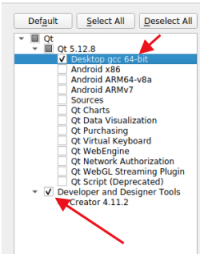
installation
sudo chmod +x qt-opensource-linux-x64-5.12.2.run
sudo ./qt-opensource-linux-x64-5.12.2.run

env
indeed tools
sudo apt-get install libgl1-mesa-dev libglu1-mesa-dev -y
add kits
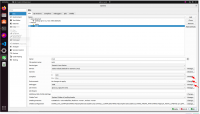

add gcc and g++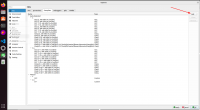
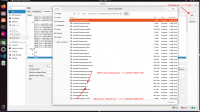


Then you can add gdb as you would gcc above
add a new device


let's coding
creat a new project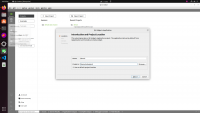
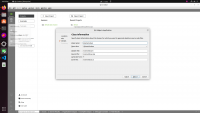


main code
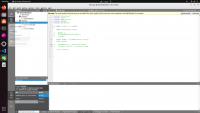 then choose Debugger->rock->Debug, just click it

copy the project to you board which has a desktop
scp build-demo4-ext4-Debug [email protected]:~
on board
The following operations are performed on ubuntu on the rk3566 or rk3568 rk3588 platform
- env
sudo apt-get install libqt5gui5 -y
- Execute the program
sudo chmod +x ./demo4
./demo4
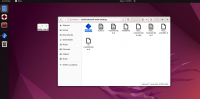
or click it